For Windows · works on your computer · download opens on release day
Never drawn a wiring diagram? With your AI, now you can.
Hand your parts list to your AI. It drafts the wiring diagram and the work tables with Pinvane. A gauge, colour or length your material does not give stays “not set” and goes on a check list instead of being filled in for you. Then you check and fix by hand.
AI connection is in Pro — 14-day free trial, no card.
How it works
You bring what you know. The AI does the drawing.
You do not need to know wiring-diagram rules. You need to know your machine — or someone who does.
Hand over your material
A parts list and a connection table, or just the parts and what each one should do. Gaps are fine.
The AI drafts with Pinvane
Your AI app uses Pinvane's commands — no clicking through screens. Out come a draft diagram, work tables and a check list.
Answer the questions, fix by hand
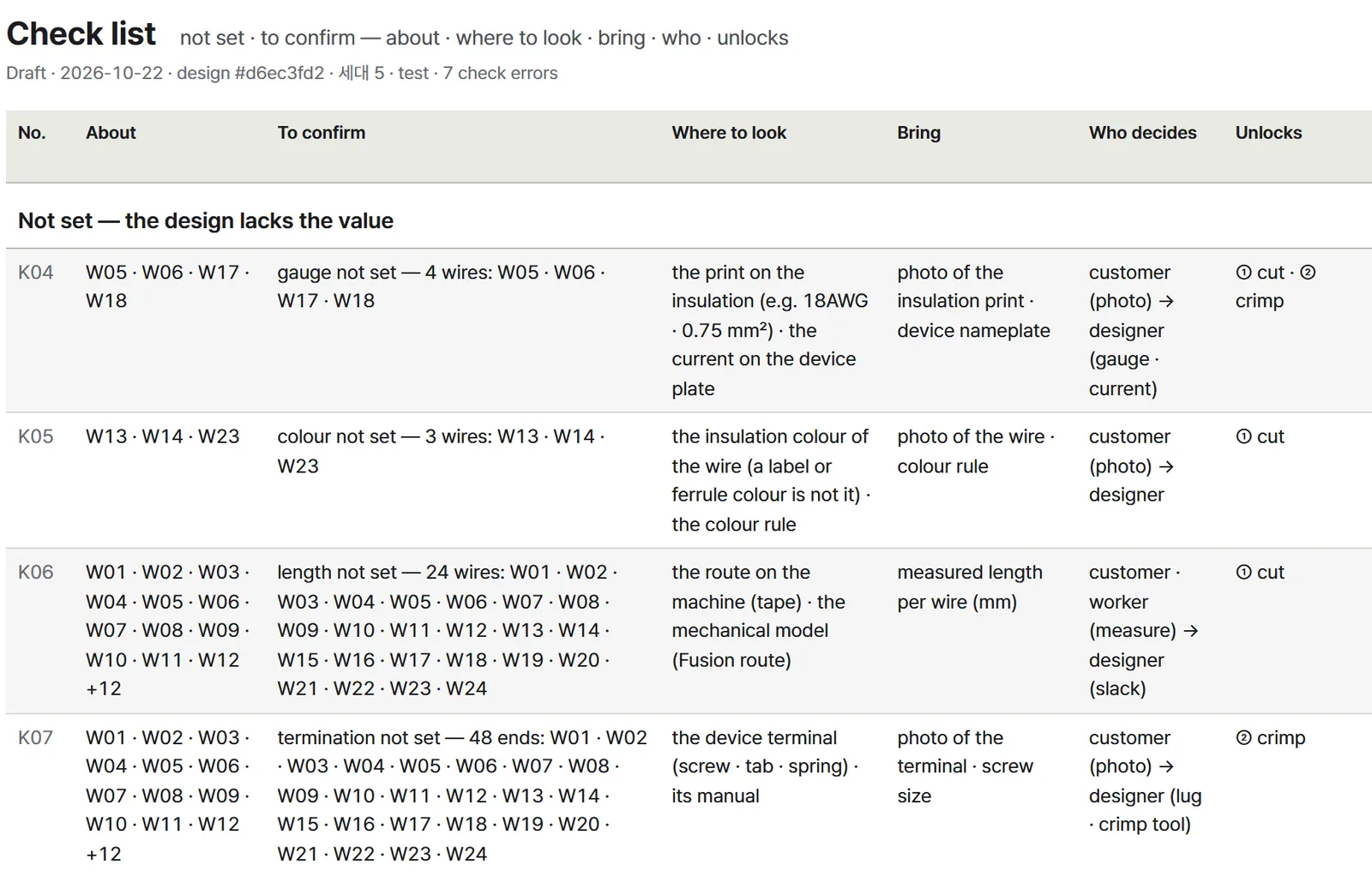
The check list says what is still undecided, where to look, who decides and which work it unlocks. Edit anything in the editor and export again; the tables are rebuilt.
Undecided stays visible
Missing values show up as questions.
When you import a parts list and connection table, or an AI adds wires through Pinvane, a gauge, colour or length your material does not give stays not set. It goes on the check list with what to confirm, where to look, what to bring and who decides. Wires you draw by hand also start with no colour or gauge until you set them.
Cut-list, pin-table and test-sheet rows show their evidence state and related check numbers.
What you get
A draft diagram and the work tables
From the same design data, in one export.
Drawings
PDF, SVG, PNG and DXF for CAD, in a drawing frame with a title block you can edit. Paper A4 to A0 or a custom size.
Work tables
Pin table, cut list, label list, work order, pre-plug check, test sheet, parts list and check list, as HTML, CSV, Excel and PDF. A table with nothing to list can be empty.
Checks
By default, each export runs design checks and print checks and records what to fix and where.
Pinvane makes drafts; people decide. Undecided production information — lengths, contacts, the real terminals — is confirmed and entered by you and your designer.E4
Made for AI to use
An AI draws, changes, checks and exports through Pinvane's local MCP server or the command line. The MCP server carries a usage guide and ready-made prompts for your AI: draw from a parts list, work through the check list, export the work tables.
You work on your drawings on your computer
Pinvane does not automatically send usage statistics or error reports, and it has no built-in cloud saving. The AI window is off until you turn it on; then your request and design information go, with your own key, to the AI provider you choose.
Tested
Six test designs, scored by two other AIs
An AI drafted 6 fictional machine designs with Pinvane. Two AI reviewers scored the drawings and work tables on our 28-point work-readiness rubric, each without seeing the other's scores. On the settled scores all 6 passed (2026-11-17): at least 24 points, and full marks on “if a worker follows the tables, will they do something wrong or miss a step?”E1
These tests check the drawing tool on fictional designs, not real machines, and no worker has wired a real machine from these tables yet. Defects we have not found may remain. Scores and limits
The download opens on release day.